
ElevenLabs
AI voice generator and voice agents platform
Freemium

referencetovideo.net
AI video generator that directs shots from image, video, and audio references
 Visit website
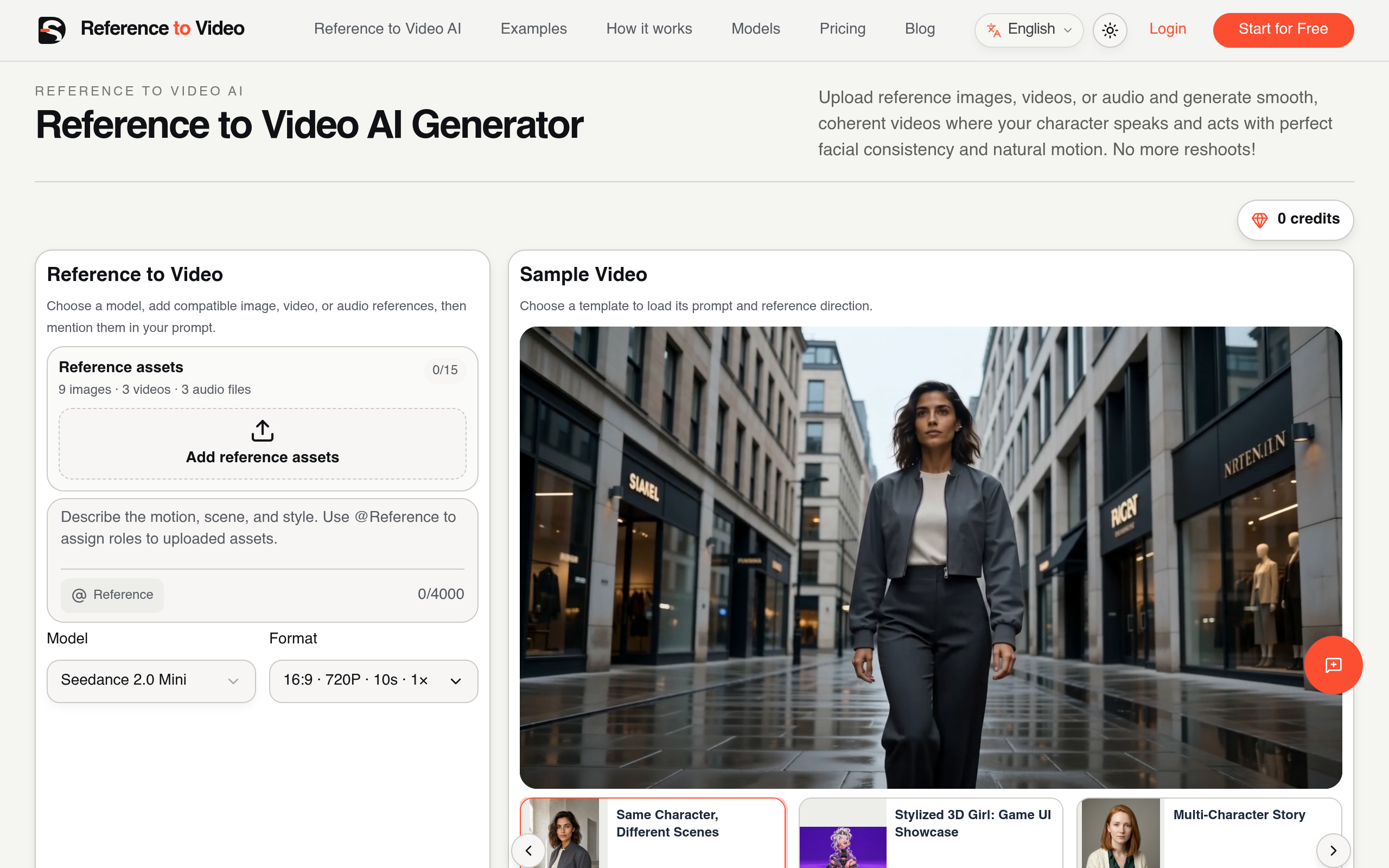
reference to video is a web-based AI video generation workflow that uses one or more source assets as creative evidence. Rather than asking a text prompt to remember a face, product, outfit, movement, camera style, and sound at once, each reference defines a specific part of a newly composed shot. Sources can include images for identity, products, outfits, or style; video for motion and camera behavior; and audio for voice, music, and timing.
A strong result does not reproduce a source frame for frame. It preserves the details that create continuity while allowing the setting, action, framing, and story beat to change. The page positions the tool for episodic creators, AI influencers, product campaigns, anime characters, fashion sequences, music videos, and branded worlds. The difference from prompt-only generation is described as control: references stay active throughout the shot, defining what must remain recognizable and what may change.
A project starts with clear images for identity, products, outfits, or style. Short video and audio references are added when they contribute motion, camera, voice, or timing.
The prompt tells the model what @Image1, @Video1, and @Audio1 control, then describes the action, setting, camera, and details that must not change.
Results are reviewed for faces, wardrobe, product geometry, roles, motion, and audio timing. The page recommends changing one instruction at a time.
Identity references aim to keep faces, hair, body proportions, and distinctive features recognizable across new scenes.
Product references are used to preserve shape, color, materials, packaging, and label placement in new shots.
A short video reference can guide gestures, timing, body movement, and performance energy.
A reference clip can carry a pan, orbit, push-in, or handheld move that is hard to describe in text.
A source can carry a location, lighting language, palette, or visual world into a newly composed shot.
On models that accept audio references, audio can guide dialogue, voice, music, beats, and action timing.
The composer works with Seedance 2.0 Mini, 2.0 Fast, and 2.5, MiniMax H3, and Gemini Omni Flash 1.1. Seedance 2.0 and MiniMax H3 accept up to nine images, three videos, and three audio files; Seedance 2.5 accepts up to 30 images, 10 videos, and 10 audio files; Omni Flash 1.1 uses seven weighted reference slots, where one video uses two slots and only one video is allowed. The composer validates the active limits.
One identity reference is intended to carry the same face, hairstyle, outfit, and proportions through changes of location and camera angle.
Separate character references plus a scene reference are used to keep faces, clothes, and roles distinct through an interaction.
One creator and one product can move between settings, such as a bedroom review and a bathroom demonstration, without changing the person or redesigning the packaging.
A full-body reference can keep a garment, material, color, and accessories fixed across generated scenes.
Product references that clearly show geometry, branding, color, and material can be reused while the creator, environment, action, or camera changes.
The page lists anime/OC characters, mascots and game characters, and music video performers as continuity workflows.
It generates a new video from one or more source assets. Images can define a person, product, outfit, scene, or style; video can guide movement and camera behavior; audio can guide voice, music, and timing. The prompt assigns a job to every reference.
A clean identity image gives the model stable evidence for facial structure, hair, proportions, and distinctive details. Additional references can define wardrobe or another angle. Consistency improves when the prompt names the character once and avoids conflicting portraits.
Image to video usually animates one still and treats it as the opening frame. reference to video can combine several images, videos, and audio files that continue to guide identity, products, motion, camera, style, or timing throughout a newly composed shot.
Yes. Supported models can accept image, video, and audio references together. Images are used for identity or appearance, a short video for motion or camera direction, and audio for dialogue, voice, beat, or pacing.
Sharp images with the subject large enough to inspect, neutral lighting, and minimal obstruction. For a character, a front or three-quarter view is suggested; for a product, include the label, shape, material, and one useful alternate angle.
Yes, but each character should have a separate image reference and a stable name. Mapping every action, outfit, and position to the correct character is recommended to reduce face swaps, wardrobe crossover, and role confusion.
Yes. Product references should clearly show geometry, branding, color, and material, while the creator, environment, action, or camera changes in each generation. Label placement and proportions should be reviewed closely.
Limits vary by model. Seedance 2.0 and MiniMax H3 accept up to nine images, three videos, and three audio files; Seedance 2.5 accepts up to 30 images, 10 videos, and 10 audio files; Omni Flash 1.1 uses seven weighted reference slots, where one video uses two slots and only one video is allowed. The composer validates the active limits.
References are often ignored when assets conflict, the subject is too small, or the prompt never explains the asset's role. The page suggests removing redundant files, cropping around the relevant detail, using explicit @Image, @Video, or @Audio tokens, and testing one change at a time.